Import & Export Settings
Import & Export
Importing and exporting theme settings and images is a crucial feature that ensures the safety and consistency of a website’s design. This functionality allows users to create backups of their customizations, preventing the loss of important configurations during updates, migrations, or unexpected system failures.
By exporting theme settings and images, users can easily restore their preferred appearance and layout without having to reconfigure everything from scratch. Additionally, this feature simplifies the process of transferring designs between different installations, making it convenient for developers and designers working on multiple projects.
Overall, the ability to import and export theme settings and images enhances efficiency, saves time, and provides a layer of security, ensuring that valuable design elements are preserved and can be quickly restored when needed.
Export
All settings and images are extracted into one compressed file (zip).
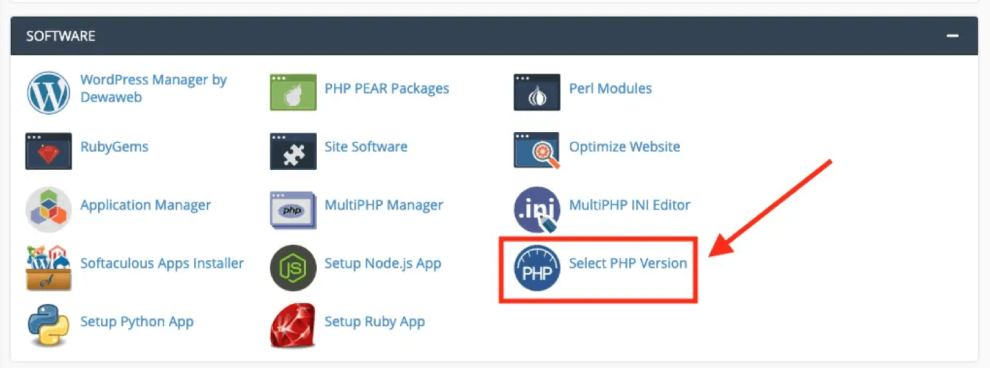
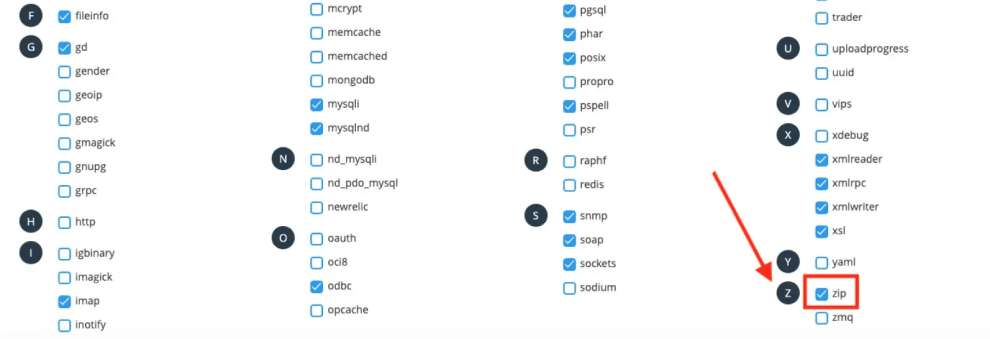
However, it's important to note that exporting settings as a ZIP file requires the Zip extension to be enabled in the php.ini configuration. The export feature will not function properly if this extension is not activated.
To allow it to, ensure that the following line is present and uncommented in your php.ini file:
extension=zip Via cPanel:
Import
For security reasons, the import process only accepts a JSON file and does not allow uploading a ZIP file. Users are responsible for ensuring that the imported file comes from a trusted source and is free from viruses or malicious content before uploading it to their server.
Steps to upload settings:
- Unzip the compressed file.
- Upload the images folder to this path: styles/zeina/theme through the cPanel or FTP account.
- Upload the settings file (.json) through the Zeina panel.